Automation can reduce repetitive work, shorten handoffs, and make routine actions more consistent. It cannot repair a process that no one fully understands.
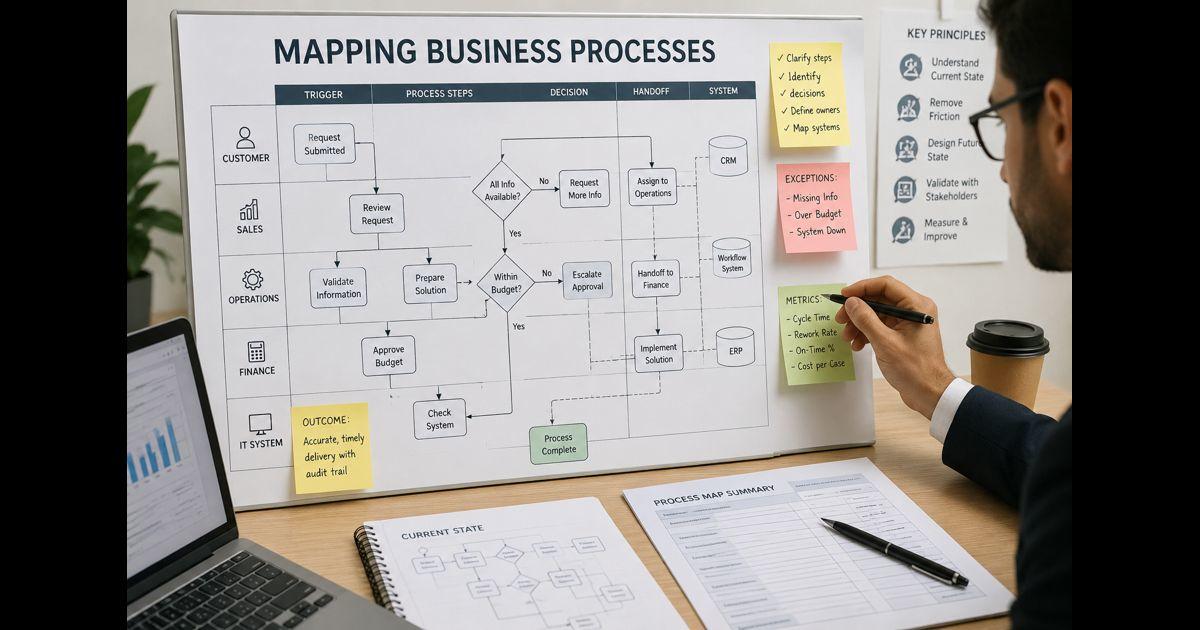
Before selecting software, identify how work actually moves from its first trigger to its completed outcome. A useful business process map makes the sequence visible: who performs each action, what information they need, where decisions occur, how work changes hands, and what happens when the normal path fails.
That level of clarity prevents a common mistake: automating a confusing process and making its errors travel faster.
Start With One Process and a Clear Business Outcome
Do not attempt to map an entire department at once. Choose one recurring process with a defined beginning and end, such as approving an invoice, onboarding a customer, responding to a service request, or publishing a report.
Write down the outcome in plain language. For example:
Ensure that approved supplier invoices are paid accurately, on time, and with an auditable record.
Then define the boundary:
- What event starts the process?
- What event proves it is complete?
- Which team owns the outcome?
- Which related activities sit outside the map?
A scope boundary keeps the map useful. “Manage accounts payable” is too broad. “Receive, review, approve, and schedule a supplier invoice for payment” is specific enough to examine.
Map the Current Reality Before Designing Improvements
The first map should describe the current state, not the process people believe should happen.
Talk to the people who perform the work. Watch a recent example move through the workflow where possible. Compare the written procedure with the actual route taken through email, spreadsheets, shared folders, messaging apps, and business systems.
Ask practical questions:
- What starts your part of the work?
- What do you check before acting?
- Where do you get the information?
- What makes you pause, ask for help, or send it back?
- What happens when data is missing or incorrect?
- How do you know the work is finished?
Current-state mapping often reveals informal steps that do not appear in a formal procedure. A coordinator may manually correct customer details, a manager may approve exceptions over email, or an employee may maintain a separate spreadsheet because the main system does not show a needed status.
Those workarounds are not minor details. They show where an automated workflow could fail, create duplicate records, or remove a safeguard that experienced staff have quietly provided.
Show Every Action, Decision, and Handoff
A basic flowchart can be enough for a small, linear process. For work that passes across teams, use swimlanes. Each lane represents a role, team, or system, making ownership and handoffs easy to see.
Include these elements in the map:
|
Element |
What to record |
|
Trigger |
The event that begins the process |
|
Activity |
A meaningful action, such as verify, create, approve, notify, or update |
|
Decision |
A question with different routes depending on the answer |
|
Owner |
The person, team, or system responsible |
|
Input |
Information, document, request, or record required |
|
Output |
The result produced by the activity |
|
System |
The application, folder, form, or channel used |
|
Handoff |
Where responsibility moves to another owner |
|
End point |
The completed, accepted outcome |
Keep each action observable. “Process the request” hides too much. “Check that the request contains a signed agreement” shows a real action that can be assessed.
A decision should state the rule being applied. Instead of writing “review request,” write “Is the agreement signed by an authorized contact?” The answer determines whether the workflow continues, pauses, or returns to the requester.
Record the Information That Controls the Workflow
Many automation projects fail because the map shows activities but not the information that drives them.
For each step, identify:
- Where the information originates
- Whether it is structured, such as a form field or database record, or unstructured, such as an email or PDF
- Which fields are required
- Who can change the information
- Which system is the authoritative record
- Whether sensitive or regulated data is involved
- How long the information must be retained
This matters when work crosses systems. A sales representative may enter customer details in a CRM, finance may rely on an accounting platform, and operations may track fulfillment in a separate tool. Automation needs clear rules for which record takes priority when the same field differs across systems.
A map should also identify where data is copied manually. Repeated copying is often a candidate for integration, but only after the team confirms that the source data is reliable and consistently formatted.
Treat Exceptions as Part of the Process
The “happy path” is rarely the whole process.
A request may arrive without required information. A customer may need a different approval route. A document may be unreadable. A system may be unavailable. A transaction may exceed an approval limit.
These are normal operating conditions, not edge cases to ignore until after launch.
For every important decision point, document:
- The exception that can occur
- The rule for resolving it
- The person authorized to decide
- The maximum time it may wait
- The record that explains the outcome
- Whether a customer, supplier, or employee must be notified
If an exception requires judgment, context, or accountability, it may not belong in a fully automated path. The workflow can still route the case, collect the relevant evidence, and alert the correct person. The final decision can remain human.
This distinction is especially important when AI is involved. AI may help classify documents, draft a response, or surface relevant information, but high-impact decisions need defined review points. VocalNewsMedias’ guide to human review for AI outputs provides a useful companion framework for those controls.
Measure the Process Before Promising Improvement
A map explains the workflow. Basic measurements show where improvement is needed.
Choose measures that reflect the actual business outcome, such as:
- Total completion time
- Active work time
- Waiting time between handoffs
- Rework rate
- Number of requests returned for missing information
- Error rate
- On-time completion rate
- Cost or staff time per completed case
Separate active time from waiting time. A request may require ten minutes of work but take five days to complete because it waits in several queues. Automating one ten-minute task may not improve the customer experience if the major delay sits with an unclear approval rule.
Use a sample of completed cases rather than relying only on estimates. The aim is not perfect measurement; it is a trustworthy baseline for deciding what deserves attention.
Remove Friction Before You Automate It
Once the current state is visible, examine each step.
Ask four questions:
- Does this step contribute to the required outcome, risk control, or customer experience?
- Is it duplicated elsewhere?
- Can the rule be simplified or standardized?
- Does the work require human judgment?
Remove unnecessary approval layers, duplicate data entry, unclear ownership, and outdated checks before designing automation. Standardize forms, naming conventions, request categories, and decision rules where practical.
A process that changes every week is usually a poor automation candidate. Stabilize it first. Automation works best when the trigger is clear, inputs are dependable, rules are understood, and exceptions have owners.
Design the Future State Separately
Do not overwrite the current-state map. Preserve it as evidence of how the process operated before changes.
Create a separate future-state map that shows the improved workflow. Mark which actions will be:
- Automated by a system
- Routed automatically to a person or queue
- Completed manually
- Reviewed or approved by a designated owner
- Logged for audit, quality review, or troubleshooting
The future state should answer operational questions before any build begins:
- What event triggers the automation?
- What data must be present?
- Which rule selects the next path?
- Which system performs each action?
- What happens when an integration fails?
- Who receives an alert?
- How is a manual override recorded?
- How can the workflow be paused safely?
A good design does not try to eliminate people from every step. It uses automation for structured, repeatable work while keeping responsible oversight where risk, ambiguity, or customer impact requires it.
Validate the Map With the People Who Use It
Review the current and future maps with process owners, frontline staff, IT or security teams, and anyone accountable for compliance or customer outcomes.
Use real examples:
- A standard request that should move smoothly
- A request with missing information
- A request requiring an exception
- A case involving a system outage
- A case needing a manual override
Walk each example through the future-state map. If the group cannot identify the next owner, the source of truth, or the action taken when something goes wrong, the workflow is not ready to build.
This review also improves adoption. People are more likely to trust a new workflow when their practical knowledge has shaped it.
Use a Simple Pre-Automation Mapping Sheet
For each process, maintain a concise record alongside the visual map:
|
Field |
Example |
|
Process name |
Supplier invoice approval |
|
Business outcome |
Accurate, timely payment with an approval trail |
|
Trigger |
Invoice received through the designated inbox |
|
End point |
Payment scheduled and supplier record updated |
|
Process owner |
Accounts payable manager |
|
Main systems |
Email inbox, accounting platform, document storage |
|
Required inputs |
Supplier ID, invoice number, amount, purchase order |
|
Key decisions |
Is the invoice valid? Does the amount need additional approval? |
|
Exceptions |
Missing purchase order, duplicate invoice, disputed amount |
|
Controls |
Approval threshold, record retention, payment segregation |
|
Baseline measures |
Cycle time, exception rate, duplicate-payment rate |
|
Automation boundary |
Extract data and route approvals; retain human approval for exceptions |
This sheet creates a shared reference for operations, technology, risk, and leadership teams. It also makes future changes easier to review.
FAQ
Should every mapped process be automated?
No. Mapping may show that a process should be removed, simplified, standardized, or supported with clearer ownership instead. Automation is most useful for stable, high-volume, rule-based work with reliable inputs.
How detailed should a process map be?
It should be detailed enough for a new team member to understand the path of work, the decisions, the responsible owners, and the exception routes. Avoid documenting every mouse click unless that detail is necessary for risk control or system design.
What is the difference between a current-state and future-state map?
A current-state map records how work operates today, including delays and workarounds. A future-state map shows the improved process after unnecessary steps are removed and automation or new controls are added.
Who should approve a process map?
The process owner should confirm accountability, while frontline staff validate practical accuracy. Technology, security, legal, finance, or compliance teams should review the map when their systems, data, or controls are involved.
A business process map is not paperwork created before the “real” automation work. It is the design evidence that makes automation safer, more useful, and easier to maintain.